
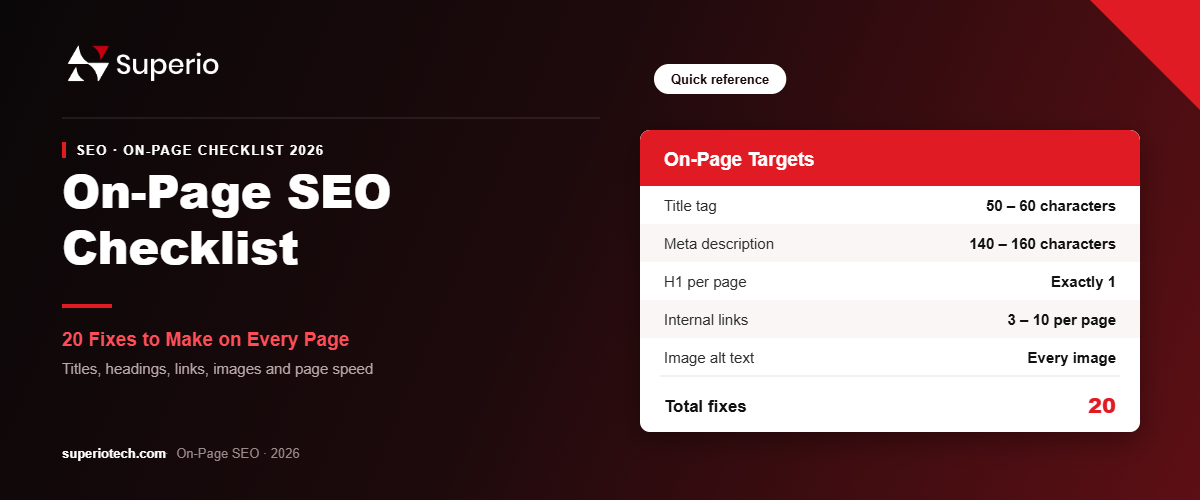
An on-page SEO checklist is only useful if you can finish it. So this one is built around 20 fixes you can apply to a single page in under an hour, ordered from the changes that move rankings most to the ones that simply stop you losing them.
Work through it page by page rather than site-wide. Because search engines rank pages rather than websites, one properly optimised page will teach you more than fifty half-finished ones.
Table of Contents
- What Is On-Page SEO?
- Content and Keyword Fixes (1–6)
- Title, Meta and Heading Fixes (7–12)
- Link and Structure Fixes (13–16)
- Technical On-Page Fixes (17–20)
- The Issues We Find Most Often
- How to Prioritise the 20 Fixes
- Quick Reference Table
- Free Tools for On-Page SEO
- How Often to Run This Checklist
- How to Measure the Results
- Mistakes to Avoid
- Conclusion
What Is On-Page SEO?
If search optimisation is new to you, start with our guide to what SEO is. On-page SEO is everything you control on the page itself: the content, the title, the headings, the internal links, the images and the way the page loads. In other words, it is the part of search optimisation that does not depend on anyone else.
That distinction matters. Off-page work relies on other websites linking to you, which takes months and is never fully in your hands. On-page work, by contrast, can be done this afternoon and usually shows results within a few weeks. For a fuller comparison, see our guide on on-page vs off-page SEO.
Content and Keyword Fixes (1–6)
1. Give the page one primary keyword
As a rule, each page should target a single primary keyword and a handful of close variations. If two pages target the same term, they compete with each other and both rank lower. Our keyword research guide covers how to pick the right one.
2. Match the search intent
First, search your keyword and look at what already ranks. If the first page is full of comparison articles, a product page will not break in. Therefore, match the format first and improve on it second.
3. Answer the query in the first 100 words
So, put the direct answer near the top, then expand below. Readers get what they came for immediately, and search engines find the relevant text without digging.
4. Cover the subtopics competitors cover
Next, scan the top three results for the sections they all include. If every one of them explains pricing and you do not, your page reads as incomplete. However, do not pad; add only what genuinely helps.
5. Use the keyword naturally, not repeatedly
For example, include it in the title, the first paragraph, one or two subheadings and the URL. After that, write normally. Keyword stuffing has not worked for a decade and now actively hurts readability scores.
6. Remove thin and duplicate pages
Pages with 150 words of generic text drag down the whole site. Consequently, merge them into stronger pages or remove them entirely, then redirect the old URLs.
Title, Meta and Heading Fixes (7–12)
7. Write a title tag of 50 to 60 characters
Put the primary keyword near the front and make the title readable. Anything longer gets cut off in search results, which costs you clicks even when the ranking is fine.
8. Write a meta description that earns the click
Ideally, keep it between 140 and 160 characters, include the keyword once, and describe the benefit rather than the contents. Although descriptions are not a ranking factor, they heavily influence click-through rate.
9. Use exactly one H1
In short, one H1 per page, containing the primary keyword, matching what the page is actually about. Multiple H1s confuse the hierarchy and make the page harder to scan.
10. Structure H2s and H3s logically
H2 for main sections, H3 for subsections underneath them. Never skip levels for styling reasons, since the heading structure is how both readers and crawlers understand your page.
11. Keep the URL short and descriptive
Instead, use a slug like /on-page-seo-checklist/ rather than /blog/2026/11/post-id-4471/. Additionally, avoid dates in URLs unless you run a news site, because they make evergreen pages look stale.
12. Add structured data where it fits
Likewise, mark up articles, products, FAQs, reviews and local business details. Structured data does not raise rankings directly, but it can earn rich results that increase clicks noticeably.
Link and Structure Fixes (13–16)
13. Add three to ten internal links
Equally, link to related pages using descriptive anchor text rather than “click here”. Internal links spread authority through the site and help search engines discover pages that nothing else points to.
14. Link out to credible sources
Citing a study or an official source adds value and signals that the page is researched. Moreover, it costs you nothing in ranking terms, despite what the old advice claimed.
15. Fix broken links and redirect chains
Broken links waste crawl budget and frustrate readers. Similarly, a chain of three redirects slows the page and dilutes the signal, so point old URLs directly at the final destination.
16. Make sure the page is reachable in three clicks
If a page sits five levels deep with no links pointing to it, it will rarely rank. Add it to a relevant category page, a hub article or the navigation.
Technical On-Page Fixes (17–20)
17. Compress every image and set dimensions
Specifically, serve images in WebP, size them for their container, and set width and height attributes so the layout does not shift while loading.
18. Write descriptive alt text
Simply describe what the image shows, in plain language, including the keyword only when it genuinely fits. Alt text helps accessibility first and image search second.
19. Check Core Web Vitals for the page
Then, run the URL through PageSpeed Insights and address the largest contentful paint and layout shift warnings. Mobile scores matter most, because that is how most visitors arrive.
20. Confirm the page is indexable
Finally, check that the page is not blocked by robots.txt, not set to noindex, and has a self-referencing canonical tag. This single check catches more lost traffic than any other item on the list.
The Issues We Find Most Often
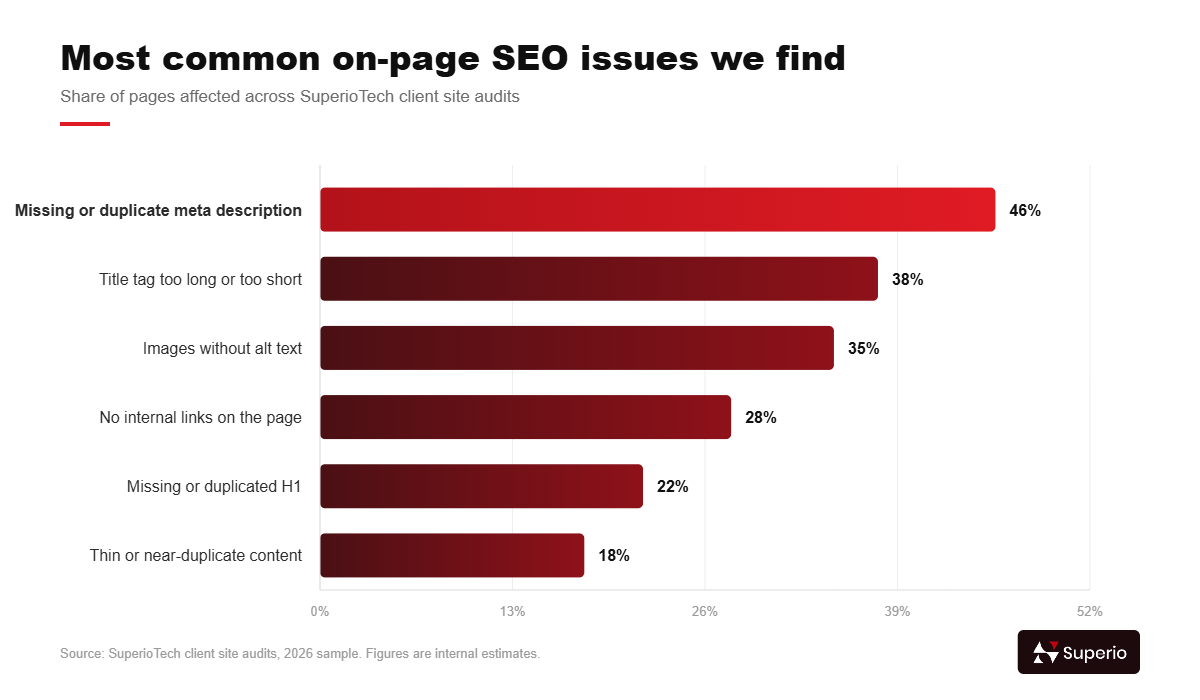
Notice that almost none of these are complicated. Instead, they are small omissions repeated across hundreds of pages, which is exactly why a checklist beats inspiration.
“Focus on making your content useful, reliable and people-first.” — Google Search Central
How to Prioritise the 20 Fixes
Twenty items is a lot for one sitting, so work in order of impact rather than top to bottom. Generally, the fixes split into three tiers.
| Tier | Fixes | Why first |
|---|---|---|
| Do today | Indexability, intent match, title tag, H1, one primary keyword | These decide whether the page can rank at all |
| Do this week | Internal links, meta description, subtopic coverage, answer early | These move position and click-through rate |
| Do this month | Images, structured data, Core Web Vitals, broken links, thin pages | These protect rankings you already have |
Notably, the first tier takes about fifteen minutes per page once you are used to it. Therefore, run tier one across every important page before you perfect a single one, because a site-wide floor beats one polished exception.
Quick Reference Table
| Element | Target | Common mistake |
|---|---|---|
| Title tag | 50 – 60 characters, keyword first | Truncated in search results |
| Meta description | 140 – 160 characters | Missing or auto-generated |
| H1 | Exactly one per page | Duplicated or missing |
| URL slug | Short, descriptive, hyphenated | Dates and ID numbers |
| Internal links | 3 – 10 with descriptive anchors | “Click here” or none at all |
| Images | WebP, compressed, alt text set | Large JPGs with empty alt |
| Word count | Whatever the intent requires | Padding to hit a number |
| Indexability | Indexable with self-canonical | Accidental noindex |
Not Sure What Your Pages Are Missing?
Get a Free On-Page Audit From SuperioTech
We will review your key pages against this checklist and send you a prioritised list of fixes with the expected impact.
Free Tools for On-Page SEO
Fortunately, you do not need a paid subscription to work through this checklist. These free tools cover almost everything above.
Google Search Console shows which queries each page already ranks for, which is the fastest way to confirm you picked the right primary keyword. Moreover, its URL Inspection tool tells you instantly whether a page is indexed and what canonical Google chose.
PageSpeed Insights reports Core Web Vitals for an individual URL on both mobile and desktop, with specific recommendations rather than a vague score.
Google Rich Results Test validates your structured data and shows which rich result types the page qualifies for.
A browser SEO extension, such as one that reveals titles, headings and meta tags in a sidebar, turns items 7 to 12 into a ten-second visual check.
Yoast or Rank Math inside WordPress handles titles, descriptions, canonicals and readability without touching code. Similarly, our own free SEO audit tool gives you a quick site-wide picture before you start on individual pages.
Paid crawlers help once you pass a few hundred pages, but for most small websites the free set above is genuinely enough.
How Often to Run This Checklist
Overall, apply the full list once when a page is published, then review it on a schedule rather than whenever you remember.
| Page type | Review frequency | What usually needs updating |
|---|---|---|
| Money and service pages | Every 3 months | Titles, offers, internal links |
| Blog posts that rank | Every 6 months | Statistics, dates, new sections |
| Blog posts that do not rank | Every 6 months | Intent match, merge or remove |
| Product pages | Every 6 months | Descriptions, schema, images |
In practice, updating ten existing pages usually produces more traffic than publishing one new one, which is why experienced teams spend as much time editing as writing.
How to Measure Whether the Fixes Worked
Finally, decide how you will judge the work before you start, otherwise every change feels like an improvement. Record three numbers per page in a simple sheet: average position, impressions and clicks from Search Console, taken over the 28 days before you edit.
Then wait. On-page changes usually take two to six weeks to settle, because the page has to be recrawled and reassessed. Checking after three days tells you nothing except how volatile the results page is that week.
When you do review, compare like with like. Seasonal demand, algorithm updates and competitor changes all move the numbers, so look at impressions alongside position rather than position alone. For instance, a page that drops from position 6 to 8 while impressions double is usually ranking for more queries, not fewer.
Above all, change one meaningful thing at a time on your most important pages. If you rewrite the title, the intro and the internal links together and traffic falls, you will not know which one caused it.
Mistakes to Avoid
- Optimising before checking intent. A perfect title on the wrong page format will still not rank.
- Chasing a keyword density number. There is no target percentage, only readable writing.
- Changing titles every few weeks. Give a change at least four to six weeks before judging it.
- Ignoring internal links. This is the cheapest ranking improvement available and the most commonly skipped.
- Treating on-page as a one-time job. Pages decay as competitors update theirs.
On-page work also needs a healthy site underneath it, so pair this with our guide on how to run a technical SEO audit. After that, authority building takes over, which we cover in off-page SEO techniques.
Conclusion
In conclusion, this on-page SEO checklist works because none of the 20 fixes are difficult. Set one primary keyword per page, match intent, answer early, write a clean title and description, use one H1, add internal links with real anchor text, compress your images and confirm the page can be indexed. Then review on a schedule instead of relying on memory.
If you would rather have the audit and the fixes handled for you, our SEO services in Pakistan cover on-page, technical and content work with monthly reporting. You can also start with our free SEO audit tool.
Ready to Fix Your Pages?
Book a Free Strategy Session
Share your site and target keywords, and we will show you which pages to fix first for the fastest gains.