

A technical SEO audit checks whether search engines can crawl, render and index your website properly. In other words, it fixes the plumbing before you spend money on content. So if your pages are not ranking despite good writing, this is usually where the problem sits.
This guide walks through a complete audit in ten steps using free tools only. Most small sites take two to four hours the first time, and roughly an hour on every review after that.
Table of Contents
- What Is a Technical SEO Audit?
- The Free Tools You Need
- How to Run the Audit: 10 Steps
- Where Pages Drop Out of Search
- Core Web Vitals Thresholds
- Crawl Budget: When It Matters
- JavaScript Rendering and Indexing
- How to Prioritise What You Find
- What a Good Audit Report Looks Like
- How Often to Audit
- Extra Checks After a Migration
- Mistakes to Avoid
- Conclusion
What Is a Technical SEO Audit?
For background on the wider discipline, read our guide to what SEO is. Put simply, a technical SEO audit is a structured review of everything that affects how search engines access your site: crawling, indexing, site speed, mobile rendering, duplicate content, redirects, security and structured data.
Importantly, it is not about content quality or backlinks. Those matter enormously, but they sit outside this job. Think of it this way: on-page work decides whether a page deserves to rank, off-page work decides whether it is trusted, and technical work decides whether it can be seen at all. Our guide on on-page vs off-page SEO explains how the three fit together.
Consequently, a site with serious technical problems will underperform no matter how good the writing is, which is why an audit should come before any content investment.
The Free Tools You Need
Helpfully, you can complete this entire audit without paying for anything.
| Tool | What it covers | Cost |
|---|---|---|
| Google Search Console | Indexing, coverage errors, sitemaps, mobile usability | Free |
| PageSpeed Insights | Core Web Vitals and speed recommendations | Free |
| Screaming Frog SEO Spider | Crawling, redirects, duplicate titles, broken links | Free up to 500 URLs |
| Google Rich Results Test | Structured data validation | Free |
| Bing Webmaster Tools | A second crawler’s view of the same site | Free |
| SuperioTech audit tool | Quick site-wide health snapshot | Free |
Start with our free SEO audit tool for a fast overview, then use Search Console and a crawler to investigate whatever it flags.
How to Run the Audit: 10 Steps
1. Check how many pages are indexed
Start by opening the Pages report in Search Console and compare indexed pages against the number you expect. If you have 400 pages and only 90 are indexed, you have found your biggest problem already. Read the exclusion reasons listed underneath, because they name the cause directly.
2. Review robots.txt and your XML sitemap
First, visit yoursite.com/robots.txt and confirm you are not blocking anything important. Next, check that your sitemap lists only canonical, indexable URLs and is submitted in Search Console. Sitemaps full of redirects and 404s waste crawl budget.
3. Crawl the site and fix broken links
Next, run Screaming Frog over the site and sort by status code. Fix every internal 404 by updating the link or redirecting the URL. Similarly, remove links pointing to pages you deliberately deleted rather than leaving them broken.
4. Clean up redirects
Then look for redirect chains and loops. A chain of three hops slows the page and dilutes the signal, so point each old URL straight at its final destination. Additionally, use 301 redirects for permanent moves rather than 302s.
5. Audit canonical tags
As a rule, every indexable page should carry a self-referencing canonical tag. Problems appear when canonicals point to the wrong page, conflict with the sitemap, or are missing on parameter and pagination URLs. Consequently, duplicate versions compete and Google picks one you did not intend.
6. Find duplicate and thin content
After that, sort your crawl by title tag and look for repeats, which usually reveal duplicated templates, filtered category pages or tag archives. Then decide for each: improve it, merge it or noindex it.
7. Test mobile rendering
Because Google indexes the mobile version of your site, check that mobile pages contain the same content, headings and links as desktop. Moreover, test on a real phone rather than just resizing your browser window.
8. Measure Core Web Vitals
Now run your most important templates through PageSpeed Insights: the homepage, a service page, a blog post and a product page. One slow template usually affects hundreds of URLs, so fixing the template fixes the site.
9. Check HTTPS and security
Also, confirm the certificate is valid, that HTTP redirects to HTTPS site-wide, and that no page loads mixed content. Browsers flag insecure pages, which costs you trust before search engines even get involved.
10. Review architecture and internal links
Finally, check that every important page is reachable within three clicks of the homepage and has internal links pointing to it. Orphan pages, which nothing links to, are extremely common and almost never rank.
Where Pages Drop Out of Search
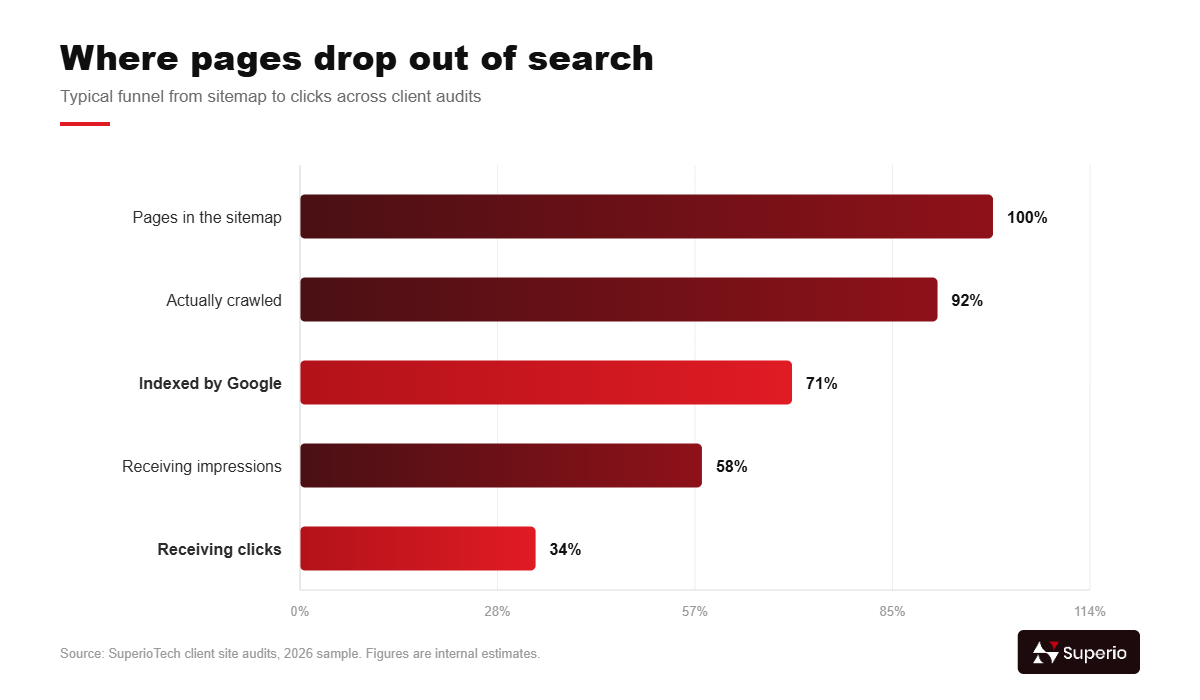
Notably, the pattern repeats on almost every site we audit. Crawling is rarely the issue; indexing is. Therefore, when you find a large gap between crawled and indexed pages, look first at duplicate content, thin pages and conflicting canonicals rather than at your server.
“Google doesn’t guarantee that it will crawl, index, or serve all of your pages.” — Google Search Central
Core Web Vitals Thresholds
Together, these are the three metrics Google uses to judge page experience. Each one is measured at the 75th percentile of real visits.
| Metric | Good | Needs improvement | Poor |
|---|---|---|---|
| Largest Contentful Paint | Under 2.5s | 2.5s – 4.0s | Over 4.0s |
| Interaction to Next Paint | Under 200ms | 200ms – 500ms | Over 500ms |
| Cumulative Layout Shift | Under 0.1 | 0.1 – 0.25 | Over 0.25 |
In practice, most failures come from four causes: uncompressed images, render-blocking scripts, heavy page builders and missing image dimensions. Fixing those four handles the majority of WordPress sites.
Found Problems You Cannot Fix?
Get a Full Technical Audit From SuperioTech
We crawl the whole site, prioritise every issue by traffic impact, and either hand your developer a clear brief or fix it ourselves.
Crawl Budget: When It Actually Matters
In simple terms, crawl budget is the number of pages a search engine is willing to fetch from your site in a given period. For most small websites it is a non-issue, because Google will happily crawl a few hundred pages whenever it likes.
However, it becomes real once a site passes roughly ten thousand URLs, or when a store generates endless filter combinations. In those cases, crawlers spend their time on parameter URLs, sorted category pages and expired products instead of the pages that earn money.
Fortunately, the fixes are straightforward. Block obviously useless parameter URLs in robots.txt, noindex thin filter pages, remove old URLs from the sitemap, and reduce redirect chains so each fetch lands on a real page. Additionally, improve server response time, since a faster server lets crawlers request more pages in the same window.
To check whether this applies to you, open the Crawl Stats report in Search Console. If total crawl requests are far higher than your page count, and the average response time is slow, crawl waste is costing you indexation.
JavaScript Rendering and Indexing
These days, modern sites often build content with JavaScript, which creates a gap between what a visitor sees and what a crawler initially receives. Because Google renders pages in a second pass, heavily client-rendered content can be indexed late or incompletely.
So, to test this, open the URL Inspection tool in Search Console, run a live test and view the rendered HTML. If your main heading, body copy or internal links are missing from that output, search engines are not reliably seeing them either.
Equally useful is the simple check of disabling JavaScript in your browser and reloading a key page. Whatever remains is roughly the baseline crawlers work from.
Where content is missing, the usual answers are server-side rendering, static generation or prerendering for crawlers. For WordPress sites the issue is rarer, although page builders that lazy-load entire sections can hide content in the same way. Therefore, always confirm that lazy loading applies to images rather than to text and links.
How to Prioritise What You Find
In reality, an audit always produces more issues than you can fix at once, so sort them by impact rather than by how easy they are.
| Priority | Issues | Why |
|---|---|---|
| Critical | Noindex on live pages, blocked robots.txt, broken HTTPS, server errors | These remove pages from search entirely |
| High | Wrong canonicals, redirect chains, duplicate titles, orphan pages | These split or waste ranking signals |
| Medium | Core Web Vitals, missing schema, image weight | These affect experience and click-through |
| Low | Minor validation warnings, cosmetic markup issues | Rarely worth developer time |
Generally, one critical fix outperforms twenty low-priority ones. For that reason, resist the temptation to clear the easy items first just because the list looks tidier afterwards.
What a Good Audit Report Looks Like
Ultimately, an audit is only worth the time if someone can act on it, so the output matters as much as the findings. A useful report has four columns and nothing else.
The issue, described in one plain sentence. The affected URLs, either listed or counted, so the scale is obvious. The impact, stated in terms of traffic or indexation rather than severity labels. The fix, written as an instruction a developer can follow without asking questions.
Notably, long PDF reports full of tool screenshots rarely get implemented. A shared sheet with those four columns, sorted by priority and assigned to a person, gets finished.
Furthermore, add a status column and review it fortnightly. Technical fixes stall far more often than they fail, usually because nobody owns them.
How Often to Audit
- Small sites under 100 pages: a full audit twice a year, with a monthly Search Console check.
- Growing sites and blogs: quarterly, since new content creates new duplication and orphan pages.
- Online stores: quarterly at minimum, because filters, variants and out-of-stock pages generate issues constantly.
- After any migration or redesign: immediately, then again two weeks later.
Meanwhile, set up email alerts in Search Console so you hear about coverage problems without waiting for the next scheduled audit.
Extra Checks After a Site Migration
Lastly, if you have just changed domain, redesigned the site or moved to a new platform, add these checks to the audit. Migrations cause more sudden traffic losses than any other event in SEO.
To begin, confirm that every old URL redirects to its closest equivalent, not to the homepage. Bulk redirects to the homepage are treated as soft 404s and lose the ranking value you were trying to keep. Second, check that the new site is not still carrying a staging noindex tag, which is the single most common migration mistake.
Then compare before and after. Export your top 200 URLs by clicks from Search Console before the move, and test each one afterwards. Similarly, resubmit the sitemap and watch the indexed count recover over the following fortnight.
Finally, keep the old analytics and Search Console properties active for at least six months, because you will need the historical comparison when someone asks whether the migration worked.
Mistakes to Avoid
- Auditing without a baseline. Record indexed pages, impressions and clicks before you change anything.
- Fixing symptoms instead of templates. One template fix usually resolves hundreds of URLs.
- Noindexing pages to “clean up”. Check traffic first; plenty of ugly pages still earn clicks.
- Treating every crawler warning as urgent. Tools flag issues that have no real ranking impact.
- Stopping after the audit. A report nobody implements changes nothing.
Once the technical side is healthy, move on to the page-level work in our on-page SEO checklist, then build authority with off-page SEO techniques.
Conclusion
In conclusion, a technical SEO audit is a repeatable process rather than a specialist mystery. Check indexation first, review robots.txt and your sitemap, fix broken links and redirect chains, sort out canonicals and duplicates, confirm mobile rendering, measure Core Web Vitals, verify HTTPS and make sure nothing is orphaned. Then prioritise by impact and fix the templates rather than the symptoms.
If the list that comes back is longer than your team can handle, our SEO services in Pakistan include full technical audits, prioritised fix plans and implementation support.
Want Your Site Audited Properly?
Book a Free Strategy Session
Send us your domain and we will run the crawl, flag what is costing you traffic and explain the fixes in plain language.