
Your competitor’s ads keep showing up on Google, and you wonder what they are saying, which offers they push and how long they have been advertising. Many Pakistani business owners do not know that Google shows this information for free. So, this guide on Google Ads Transparency Center gives you clear, practical answers.
The Google Ads Transparency Center lets anyone see ads run by verified advertisers. In this guide, we explain what it is, how to use it step by step and how to turn competitor ads into better campaigns for your own business.
Table of Contents
- What Is the Google Ads Transparency Center?
- What Can You See in the Transparency Center?
- How to Use the Google Ads Transparency Center: Step by Step
- How to Use It for Competitor Research
- Other Useful Ways to Use the Tool
- Limitations of the Google Ads Transparency Center
- Meta Ad Library vs Google Ads Transparency Center
- Turning Research Into Better Ads
- Real Example: Researching a Local Competitor
- What to Look for in Competitor Ads
- Building a Swipe File With the Google Ads Transparency Center
- Using the Transparency Center to Protect Your Brand
- How Often Should You Check Competitor Ads?
- Combining Research With Your Own Data
- Conclusion
What Is the Google Ads Transparency Center?
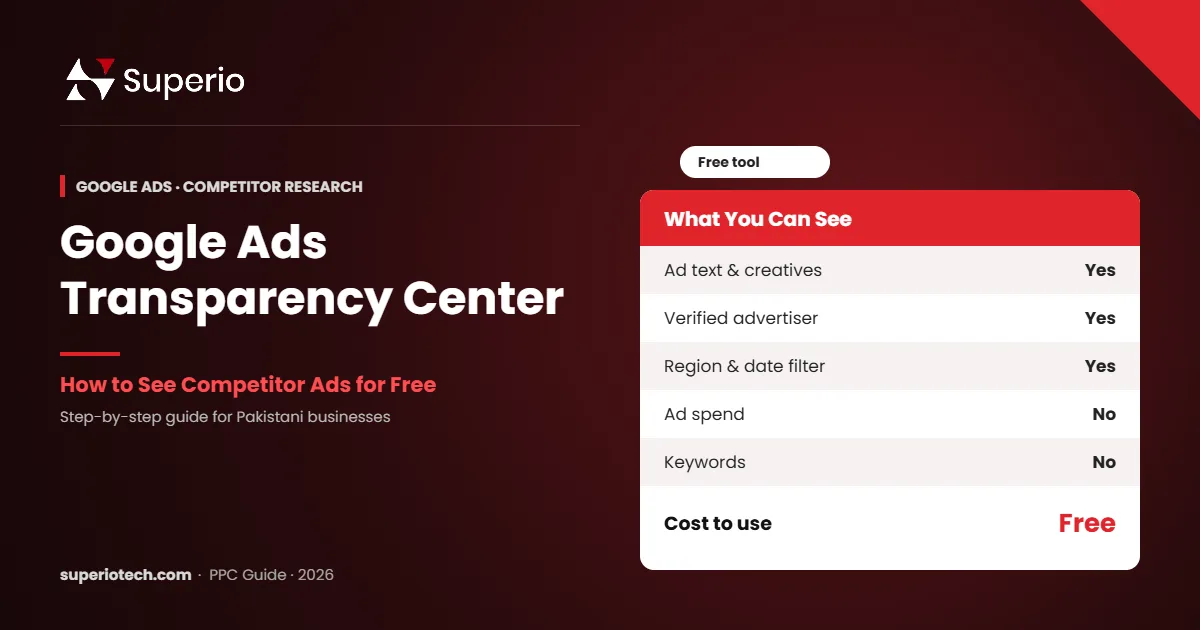
The Google Ads Transparency Center is a free, public website where anyone can search for ads shown by verified advertisers on Google platforms. You can see the ad text, images or videos, the advertiser’s verified name and location, and filter ads by country, date range and format.
Google launched it to make advertising more open and to help people understand who is behind the ads they see. You can visit it at adstransparency.google.com.
The Transparency Center covers ads shown across Google Search, YouTube, Display, Shopping and Maps, all searchable for free. — Google Ads Transparency Center
What Can You See in the Transparency Center?
| Information | Available? |
|---|---|
| Ad text, images and videos | Yes |
| Verified advertiser name and country | Yes |
| Filter by region and date | Yes |
| Ad format (text, image, video) | Yes |
| When an ad was last shown | Yes, in most cases |
| Ad spend | No (except some political ads) |
| Keywords and bids | No |
| Detailed targeting | Mostly no |
How to Use the Google Ads Transparency Center: Step by Step
- Open the website. Go to adstransparency.google.com on your phone or computer.
- Search for an advertiser or website. Type a company name or domain, such as a competitor’s website.
- Select the right advertiser. Check the verified name and country.
- Set the region. Choose Pakistan to see ads shown to Pakistani users.
- Filter by format. Choose text, image or video ads.
- Set the date range. Look at recent ads to see current offers.
- Open individual ads. Click an ad to see more details and variations.
That is all. There is no login, no fee and no limit on searches.
How to Use It for Competitor Research
This is where the tool becomes really valuable. Here is the process our PPC team at SuperioTech uses.
1. List Your Top Competitors
Search your main service on Google, for example “solar installation Lahore”. Note the businesses that appear in ads.
2. Collect Their Ads
Search each competitor in the Transparency Center. Save screenshots of their recent text and image ads.
3. Spot Their Offers
Look for offers such as “free site survey”, “easy instalments” or “10% off”. These show what customers respond to in your market.
4. Study Their Messaging
Note the words they repeat, such as “trusted”, “certified” or “same-day”. Then, think about how you can say something different and better.
5. Check How Long They Advertise
If a competitor runs the same ad for months, it probably works. Long-running ads are a strong signal of success.
6. Find Gaps
Maybe no competitor mentions warranties, WhatsApp support or local service areas. These gaps are your chance to stand out.
Want Ads That Beat Your Competitors?
Let SuperioTech Research and Run Your Campaigns
We study competitor ads, find gaps and build campaigns that stand out in your market.
Other Useful Ways to Use the Tool
- Check your own ads: see how your ads appear publicly and confirm your advertiser verification.
- Spot fake advertisers: check whether an ad claiming to be from a brand is actually verified.
- Find creative ideas: study image and video ads for design inspiration.
- Research new markets: change the region to see how brands advertise in the UAE, UK or USA.
Limitations of the Google Ads Transparency Center
The tool is helpful, but it has limits. Therefore, use it alongside other research.
- It does not show which keywords trigger the ads.
- It does not show budgets, clicks or results for most ads.
- Some small or new advertisers may show few ads.
- Ad text may appear in parts, as Google mixes headlines and descriptions.
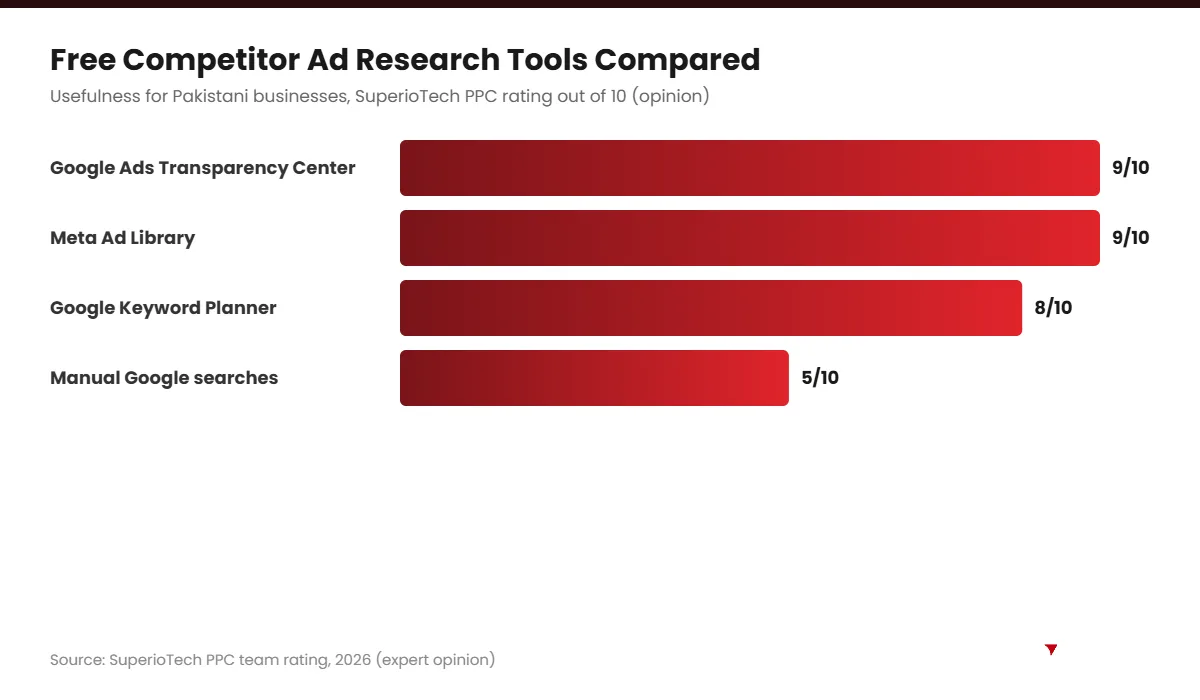
To find keywords and costs, use the Google Keyword Planner or an SEO tool alongside the Transparency Center.
Meta Ad Library vs Google Ads Transparency Center
| Feature | Google Ads Transparency Center | Meta Ad Library |
|---|---|---|
| Platforms covered | Google Search, YouTube, Display, Shopping, Maps | Facebook, Instagram, Messenger |
| Cost | Free | Free |
| Shows active ads | Yes | Yes |
| Shows spend | Only some political ads | Only political and social issue ads |
| Best for | Search and YouTube competitor research | Social media creative research |
Using both tools gives you a full picture of how competitors advertise across Google and social media.
Turning Research Into Better Ads
Research only matters if you act on it. So, after studying competitors:
- Write three new headlines that answer gaps you found.
- Create a stronger offer than the market average.
- Test new ads against your current ones for two to four weeks.
- Keep the winners and replace the losers.
For more help, see our Google Ads setup guide and Google Ads benchmarks for 2026. If you want experts to handle research and campaigns, explore our PPC services in Pakistan.
Real Example: Researching a Local Competitor
Let us walk through a practical example. Imagine you run a solar installation company in Lahore. You want to know how competitors advertise before you launch your own campaign.
- First, you search “solar installation Lahore” on Google and note three advertisers.
- Next, you open the Google Ads Transparency Center and search each company’s website.
- Then, you set the region to Pakistan and the date range to the last 30 days.
- You notice two competitors promote “easy instalments”, while one promotes “free site survey”.
- Finally, you see that none of them mention warranty length or after-sales service.
Now you have a clear opportunity. For example, your ads could highlight “10-year warranty and free maintenance visit”. As a result, your ads stand out instead of repeating what everyone else says.
What to Look for in Competitor Ads
| Element | What to note | Why it matters |
|---|---|---|
| Headlines | Main promise and keywords | Shows what they think customers want |
| Offers | Discounts, free trials, guarantees | Sets the market standard |
| Calls to action | “Call now”, “Book today” | Reveals their main conversion goal |
| Ad formats | Text, image or video | Shows where they invest |
| Ad age | How long ads have run | Long-running ads often perform well |
| Landing pages | Where ads send people | Shows how they convert visitors |
Building a Swipe File With the Google Ads Transparency Center
A swipe file is a collection of ads you can learn from. It is one of the most useful habits for any marketer. Here is how to build one with the Google Ads Transparency Center:
- Create a Google Sheet with columns for competitor, date, headline, offer, format and notes.
- Add screenshots to a shared Google Drive folder.
- Update it once a month.
- Highlight ads that run for more than two months.
- Review the file before writing any new campaign.
Over time, you will see patterns in your market. Consequently, writing strong ads becomes much faster.
Using the Transparency Center to Protect Your Brand
The tool is not only for research. It can also help protect your business.
- Spot brand misuse: check if someone is running ads using your brand name.
- Find scam ads: report fake ads that pretend to be your company.
- Check your agency’s work: confirm which ads are actually running for your account.
- Verify partners: see whether a supplier or partner is a verified advertiser.
If you find ads that misuse your brand, you can report them through Google’s ad policy help pages.
How Often Should You Check Competitor Ads?
For most small businesses, a monthly check is enough. However, check more often in these situations:
- Before launching a new campaign or offer.
- Before big seasons, such as Ramadan, Eid or 11.11 sales.
- When your cost per lead suddenly rises.
- When a new competitor enters your market.
Regular checks keep you informed without taking much time.
Combining Research With Your Own Data
Competitor research gives you ideas. However, your own campaign data tells you what really works for your audience. So, use both together.
First, test ideas inspired by competitors. Then, measure results with conversion tracking. Finally, keep what works and drop what does not. Our Google Ads setup guide explains tracking in detail, and our guide to paid ads platforms helps you choose where to test.
Used this way, the Google Ads Transparency Center becomes a regular part of a smarter, data-driven advertising routine.
Conclusion
The Google Ads Transparency Center is one of the easiest free tools for competitor research. It shows what your competitors advertise, which offers they use and how long their ads run. However, it does not show keywords or spend, so combine it with keyword research.
Use these insights to write better ads and stronger offers. If you want an expert team to do this for you, SuperioTech can help.
Ready to Outsmart Your Competitors?
Book a Free PPC Strategy Session
We will review your competitors and suggest a clear plan to win more clicks and leads.