
You finally get your new logo. It looks great on the designer’s screen. However, when you upload it to Facebook, it gets cropped. On your website, it looks blurry. On your shop sign, it looks stretched. This is one of the most common problems we fix for Pakistani businesses. So, this guide on logo size gives you clear, practical answers.
Also, the reason is simple: every platform needs a different logo size. In general, in this guide, we share the correct logo sizes for websites, social media, print and signboards in 2026, plus the file formats you should always ask your designer for.
Table of Contents
- What Is the Standard Logo Size?
- Website Logo Sizes
- Social Media Logo Sizes (2026)
- Print Logo Sizes
- Logo File Formats Explained
- Logo Versions Every Business Needs
- Common Logo Size Mistakes
- How to Resize Your Logo Without Losing Quality
- Logo Size for Email Signatures and Documents
- Logo Size for Packaging, Uniforms and Merchandise
- Logo Size for Shopify and WordPress Websites
- Logo Clear Space and Minimum Size Rules
- Your Logo File Checklist
- Quick Logo Size Reference
- Conclusion
What Is the Standard Logo Size?
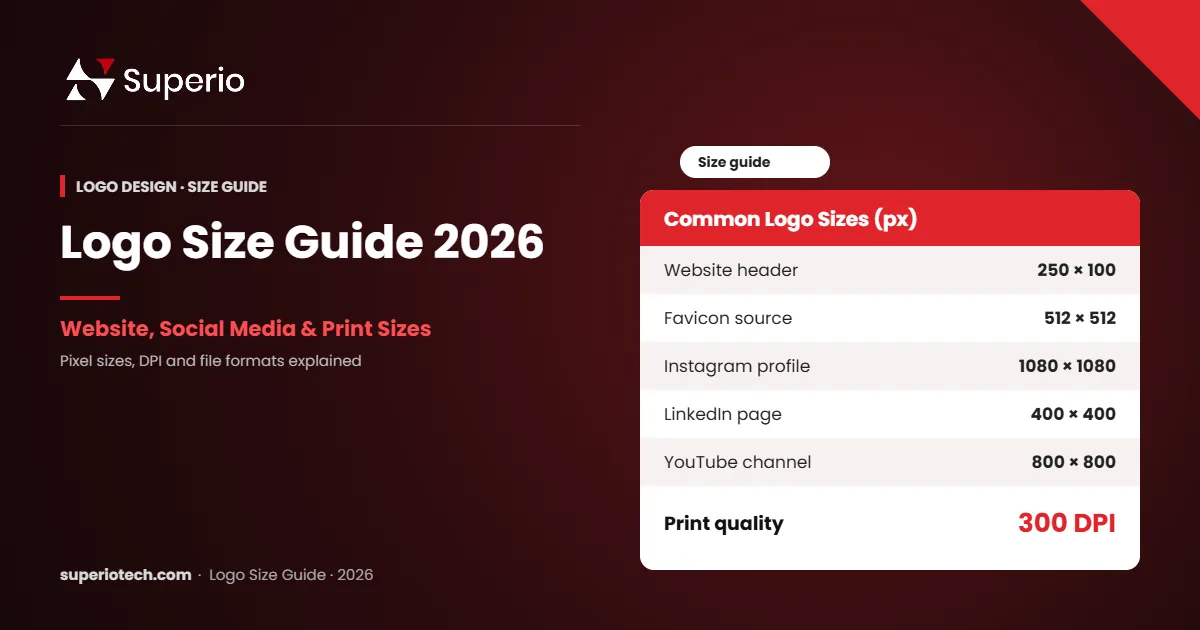
There is no single standard logo size. For websites, a common logo size is about 250 × 100 pixels for a horizontal logo. Meanwhile, social media profiles need a square logo of at least 400 × 400 pixels. Finally, print needs a vector file that can scale to any size without losing quality.
In general, in simple words, your logo should not be one file. Instead, it should be a small kit of files, each made for a specific use.
Website Logo Sizes
Your website logo appears in the header on every page. So, it must be sharp and load quickly.
| Use | Recommended size (px) | Format |
|---|---|---|
| Header logo (horizontal) | 250 × 100 | SVG or PNG |
| Header logo (square) | 160 × 160 | SVG or PNG |
| Retina header logo | 500 × 200 (displayed at half size) | PNG |
| Footer logo | 200 × 80 | SVG or PNG |
| Favicon (source) | 512 × 512 | PNG |
We recommend SVG for websites wherever possible. SVG files stay sharp on every screen and are often very small. If your theme does not support SVG, use a PNG at twice the display size for retina screens.
WordPress, for example, recommends a site icon of at least 512 × 512 pixels. In addition, you can read more in the WordPress documentation on favicons.
Social Media Logo Sizes (2026)
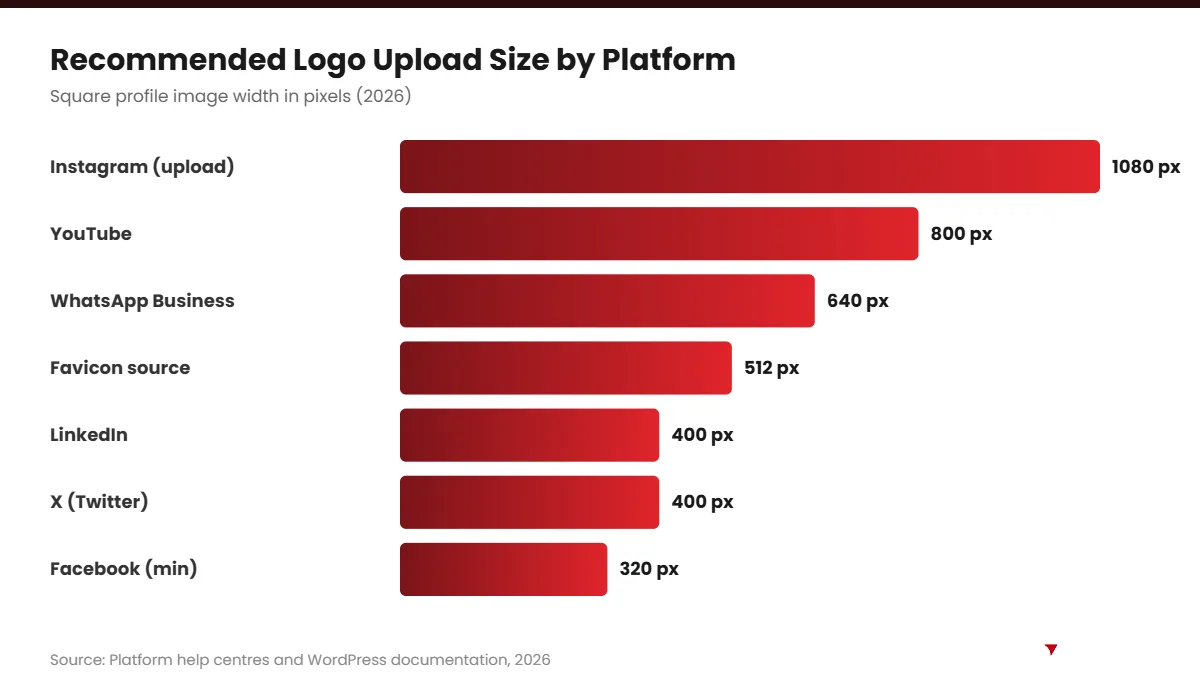
Social platforms crop profile pictures into circles or squares. Therefore, use a square version of your logo with some empty space around it.
| Platform | Profile picture size (px) | Displays as |
|---|---|---|
| At least 320 × 320 | Circle | |
| 320 × 320 (upload 1080 × 1080) | Circle | |
| LinkedIn company page | 400 × 400 | Square |
| X (Twitter) | 400 × 400 | Circle |
| YouTube | 800 × 800 | Circle |
| TikTok | At least 200 × 200 | Circle |
| WhatsApp Business | 640 × 640 | Circle |
Platforms change their sizes from time to time. So, upload a larger square image, such as 1080 × 1080 pixels, and let the platform resize it. Also, check the official help pages, such as Facebook Help Centre, when in doubt.
Print Logo Sizes
Print needs much higher quality than screens. Also, as a rule, print files should be 300 DPI (dots per inch) or vector.
| Print item | Typical logo size | File type |
|---|---|---|
| Business card | 1 – 1.5 inches wide | Vector (PDF, AI, EPS) |
| Letterhead | 1.5 – 2.5 inches wide | Vector or 300 DPI PNG |
| Brochure cover | 2 – 4 inches wide | Vector |
| Packaging and labels | Depends on label size | Vector |
| Shop signboard / panaflex | Several feet wide | Vector only |
For signboards and panaflex printing, always send a vector file. A PNG from social media will look blurry when it is printed several feet wide.
Logo Looking Blurry or Cropped?
Get a Complete Logo Kit From SuperioTech
We deliver every size and format you need for web, social media and print, ready to use.
Logo File Formats Explained
Size is only half the story. You also need the right file format. Here is a simple guide.
- AI / EPS: editable vector master files for designers and printers.
- SVG: vector format for websites; sharp at any size.
- PDF: vector-friendly format that printers accept easily.
- PNG: best for digital use with a transparent background.
- JPG: fine for photos, but no transparency; avoid for logos where possible.
- WebP: small, fast format for websites.
Logo Versions Every Business Needs
Beyond sizes, you also need different layouts. In our experience at SuperioTech, businesses that get these versions from day one avoid many problems later.
- Horizontal logo: for website headers and letterheads.
- Stacked logo: icon above the name, for square spaces.
- Icon only: for favicons, app icons and social profiles.
- One-colour version: for stamps, embroidery and single-colour printing.
- Light and dark versions: for use on white and dark backgrounds.
Common Logo Size Mistakes
- Using one JPG for everything: it will look blurry or have a white box behind it.
- Stretching the logo: always resize proportionally by holding Shift.
- No breathing space: leave clear space around the logo so it does not feel cramped.
- Tiny text in the logo: small taglines become unreadable on phones.
- No vector file: without it, you cannot print large signs properly.
“Simplicity is the ultimate sophistication.” — attributed to Leonardo da Vinci
This is especially true for logos. Simple logos scale better, from a tiny favicon to a large shop sign.
How to Resize Your Logo Without Losing Quality
- Also, start from the vector master file, not a PNG.
- Also, open it in Illustrator, Figma or a free tool such as Inkscape.
- In addition, set the canvas to the size you need.
- In addition, place the logo with enough clear space around it.
- Then, export as SVG, PNG or WebP for screens, or PDF for print.
If you only have a JPG, ask a designer to recreate the logo as a vector. This is a small cost that saves you trouble for years.
Also, for more logo help, read our guide to the 7 types of logos and our logo design price in Pakistan guide. When you need a complete logo kit, our professional logo design service includes every size and format.
Logo Size for Email Signatures and Documents
Many businesses forget about email signatures and office documents. However, these appear in front of clients every day. So, the right logo size matters here too.
| Use | Recommended logo size | Format |
|---|---|---|
| Email signature | About 150 – 300 px wide | PNG (small file) |
| Word or Google Docs header | About 1.5 – 2 inches wide | PNG at 300 DPI |
| PowerPoint slides | About 200 – 400 px wide on a 1920 px slide | PNG or SVG |
| Invoices and quotations | About 1.5 inches wide | PNG or PDF |
Keep email signature logos small, because large images can be blocked or slow to load. Also, add alt text with your company name, so it still makes sense if images are hidden.
Logo Size for Packaging, Uniforms and Merchandise
Physical items need special care, because each material prints differently.
- Packaging boxes and bags: use vector files and check the printer’s bleed and safe area.
- Embroidery on uniforms: usually 2.5 to 4 inches wide on the chest. Simple, bold logos embroider best.
- Caps: often 2 to 2.5 inches tall on the front panel.
- Mugs and pens: small print areas, so the icon-only version often works better.
- Stickers and labels: depends on label size; always send vector files.
Before you order in bulk, always ask for a printed or stitched sample. As a result, you avoid expensive mistakes.
Logo Size for Shopify and WordPress Websites
Website platforms have their own logo settings. In fact, here are practical tips for the two most popular platforms in Pakistan.
WordPress
Most WordPress themes let you upload a logo under Appearance → Customise → Site Identity. In addition, upload a PNG or SVG at twice the display size for sharp results. Then set the display width in your theme settings, often between 150 and 250 pixels.
Shopify
In Shopify themes such as Dawn, you upload the logo in the theme editor and set a custom width, usually between 90 and 250 pixels. Also, upload a high-quality PNG, and Shopify will create resized versions automatically.
Also, in both cases, check your header on a phone. A logo that looks fine on desktop may push the menu out of place on mobile.
Logo Clear Space and Minimum Size Rules
Professional brands set two simple rules for their logo: clear space and minimum size.
- Clear space: the empty area around the logo where no text or images should appear. A common rule is the height of one letter from your logo.
- Minimum size: the smallest size at which the logo stays readable, for example 100 pixels wide on screen or 1 inch in print.
Write these rules in a simple one-page brand guide. Then share it with printers, designers and staff. Consequently, your logo looks consistent everywhere.
Your Logo File Checklist
Before you finish any logo project, make sure you receive this complete set of files. In our experience at SuperioTech, missing files cause most logo problems later.
| File | Purpose |
|---|---|
| AI or EPS master | Editing and professional printing |
| SVG | Websites and scalable digital use |
| Sending to printers | |
| PNG (transparent), several sizes | Social media, presentations, documents |
| Icon-only PNG (512 × 512) | Favicon and app icon |
| White and black versions | Dark and light backgrounds |
| Brand guide (PDF) | Colours, fonts, clear space and minimum size |
Store these files in a shared Google Drive folder so your team can always find the right logo size. For favicon and banner sizes, also see our website banner and favicon size guide.
Quick Logo Size Reference
- Then, website header: about 250 × 100 px.
- After that, social profile: 1080 × 1080 px square upload.
- After that, favicon source: 512 × 512 px.
- Also, email signature: 150 – 300 px wide.
- Also, print: vector or 300 DPI.
Bookmark this list, and you will always know the right logo size for the job.
Conclusion
The right logo size depends on where your logo appears. Also, websites need clean SVG or PNG files, social media needs square versions, and print needs 300 DPI or vector files. Above all, keep a vector master file and a full set of logo versions.
If your current logo looks blurry or cropped, SuperioTech can help you create a complete, ready-to-use logo kit.
Need a Logo That Works Everywhere?
Book a Free Branding Session
Tell us about your brand, and we will create a logo kit that looks sharp on every screen and sign.