
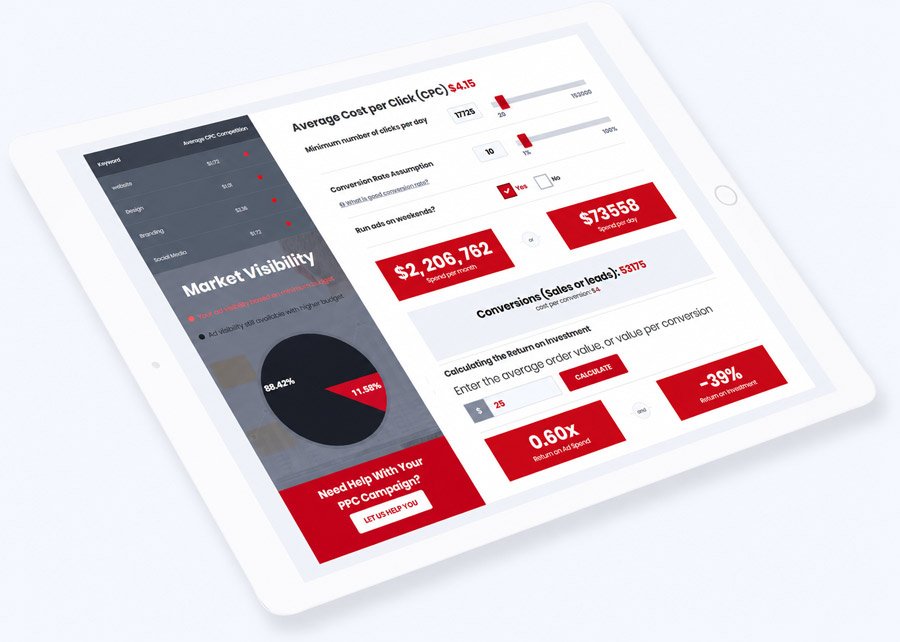
PPC Budget Calculator
Find out in seconds how much you should budget for your pay-per-click (PPC) campaign. All you have to do is enter the keywords, and we will show you everything you need to know to make the right decisions based on data.
Enter at least 3 keywords, no more than 10
How does the PPC budget calculator work?
Our PPC budget calculator helps businesses estimate a practical starting budget for Google Ads campaigns. The calculator uses your target click volume and estimated conversion rate to give you an idea of how much you may need to invest in paid search. As a starting point, we use a target of around 20 clicks per day, giving you enough campaign data to evaluate performance and make informed adjustments. We also use an estimated 4% conversion rate to help forecast potential leads or sales. You can adjust these assumptions based on your goals, industry, and campaign strategy, including whether you want to advertise throughout the week or only on selected days.
Who can benefit from this calculator?
This tool is designed for anyone planning to launch or improve a Google Ads campaign. Whether you’re a business owner, marketing professional, freelancer, or PPC specialist, the calculator can help you establish a realistic starting point for your advertising budget. At Superio Tech, we use this type of analysis to help prospective PPC clients understand the potential investment required before launching a campaign.
What features are available?
We continue to improve the PPC budget calculator to make campaign planning faster and more flexible. Current and planned capabilities include:
- Paste keyword lists directly into the calculator for faster setup
- Enter a specific daily click target instead of relying only on the slider
- Set a preferred advertising budget and calculate results based on your investment
- Modify, add, or remove keywords directly from your results
- Create shareable reports with unique URLs
- Save and manage reports through an administrative dashboard
- Customize the calculator with white-label branding, including your domain and brand colors